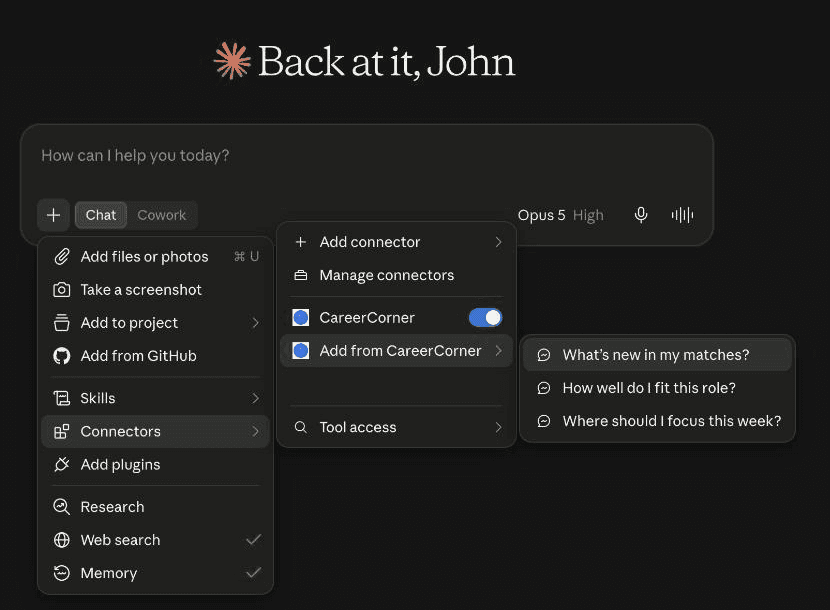
What’s new in my matches?
Check my new matches since I last looked and tell me which ones deserve my attention and why.
Ask Claude or ChatGPT about the jobs you're tracking and how well you fit them, and talk to the same coach you use in CareerCorner.
This is an MCP connection, the open standard AI assistants use to work with apps like this one. You do not need to know the name to follow the steps below.
See the jobs you're tracking and where each stands.
Read the full job description for any of them.
Hear how well you fit a job, and why.
Strengths, gaps, and whether it is worth pursuing.
Mark where a job stands, or add a new one.
Paste a link and the job joins your list.
Talk to your coach, who already knows your search.
The same coach you talk to in the CareerCorner app.
Reading is approved once. Changes are approved one at a time, as they come.
These three come built in once you are connected. Pick one, or ask in your own words.
Check my new matches since I last looked and tell me which ones deserve my attention and why.
Find the role matching "[company or job title]" among the roles I’m tracking and explain how well I fit: strengths, gaps, and whether to pursue it.
Look at the roles I’m tracking and where I am with each, then tell me the two or three things to focus on this week and why.
Pick the assistant you use. The steps differ a little for each.
https://careercorner.ai/api/mcpThe three starter prompts live under the "+" button in the message box: choose "Connectors", then "Add from CareerCorner". Ask about a job, and the link Claude gives you opens that job in CareerCorner.
ChatGPT: setup is being checked and will be documented here soon.
Any assistant that supports the same open standard can connect with the address above and your CareerCorner sign-in. Look for a place to add a connector, paste https://careercorner.ai/api/mcp, and sign in when asked.
In a terminal, run:
claude mcp add --transport http careercorner --scope user https://careercorner.ai/api/mcp
claude mcp login careercorner
Then sign in to CareerCorner in the browser that opens.
In a terminal, run:
codex mcp add careercorner --url https://careercorner.ai/api/mcpThen sign in to CareerCorner in the browser that opens.
If no browser opens, run:
codex mcp login careercornerAdd this to the file ~/.cursor/mcp.json, and create the file if it is missing:
{
  "mcpServers": {
    "careercorner": {
      "url": "https://careercorner.ai/api/mcp"
    }
  }
}
Then sign in to CareerCorner when Cursor asks.
Open the Command Palette, run "MCP: Add Server", and choose "HTTP". Paste https://careercorner.ai/api/mcp, name it careercorner, and choose "Global" so it works in every folder.
VS Code opens a browser the first time it connects. Sign in to CareerCorner there.
CareerCorner is listed in the public assistant registry under the name ai.careercorner/careercorner, so assistants that browse it can find it by name.